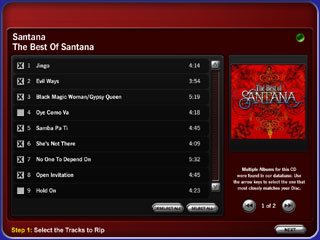
In an effort to make music library management extremely intuitive in the home, Cinemar has
released our own CD Ripping Engine for MainLobby. Although it doesn't require MusicLobby
it is the perfect compliment.
In the past, users were expected to interact with J River's Media Center to
add CD's to their Library. Now the user can simply insert a music CD and view
Album information, then rip directly from within MusicLobby's attractive
user interface. Cover art, track titles and tagging are completely automated
as well as adding to your existing library within MusicLobby. The user can
also select preferred tracks for ripping.
Features
Supported ripping formats (MP3, WMA, OGG, WAV)
Use J River Media Center to autoconvert to other formats such as APE
CD, cover art and track lookup
Automatic file tagging
Adds CD to existing J River Media Center library and MusicLobby
Rip to networked drive
Create multiple ripping stations (control ripping process
from any connected client including wireless devices)
Auto-discovery of disc when inserted in drive
Increases overall end user experience
Simplifies the ripping process for absolute novice
users (only 2 steps with onscreen prompts)
Ripping progress indicator notifies of disc
completion and disc ejection